How does unit cost work on an inventory adjustment?
TB Books · inventory · Last updated November 28, 2026 · Version 1
This process works in apps: TB Books
This article will teach you when you type the unit cost on an adjustment, and when Tire Base uses the cost already on the product.
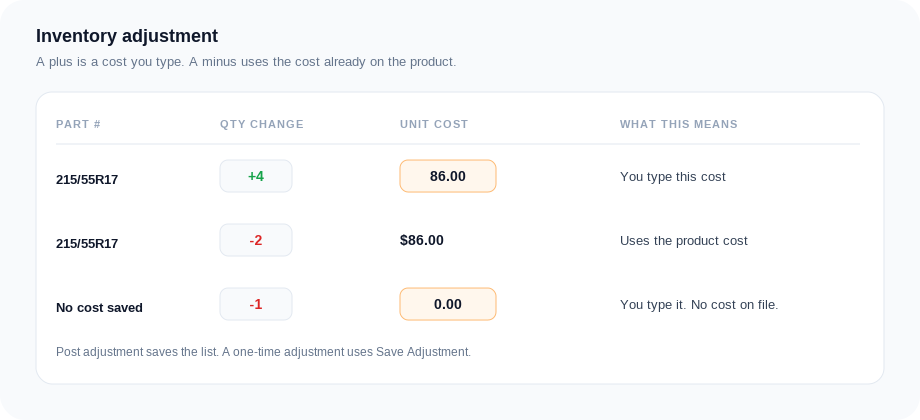
An inventory adjustment changes how many you have. The unit cost is the dollar value of that change. Adding stock lets you type the cost of the new units. Removing stock uses the average cost or the standard cost already saved on the product. If the product has neither, you type the cost on the way out too.
Steps
- Open Inventory in Books.
- Click New Adjustment.
- Choose Adjustment List, pick the location, and click Start adjustment list. Or choose One-time adjustment and pick the part.
- Enter Qty change. A plus adds stock. A minus removes stock.
- When Qty change is a plus, type Unit cost. That is the value of the units you are adding. On a one-time adjustment this field is Adjustment Unit Cost.
- When Qty change is a minus and the product has an average cost or a standard cost, Unit cost shows that amount and you cannot change it. The adjustment removes inventory at that cost.
- When Qty change is a minus and the product has no average cost and no standard cost, type Unit cost. Tire Base uses that amount because there is no cost on the product to remove.
- On a list, click Post adjustment. On a one-time adjustment, click Save Adjustment. Stock does not move on a list until you post it.
Conclusion & best practices
A plus is a cost you enter. A minus uses the cost already on the product. Type a cost on a minus only when the product has no average cost and no standard cost. Last cost can fill the box as a suggestion. It does not replace an average cost or a standard cost. Set the product cost on the product when you want later adjustments to pick it up on their own.