How to create a sales quote in Books?
TB Books · quotes · Last updated September 24, 2026 · Version 1
This process works in apps: TB Books, TB POS
This article will teach you how to start a quote from Orders, add products and services, and convert it to a work order when the customer accepts.
A sales quote prices tires and services before the customer authorizes the job. In Books it lives under Orders → Quotes. New Quote opens Select Customer, then the quote itself. The What’s Next banner tells you to add products or services in the search row. A quote does not post to the general ledger and does not take stock. When the customer accepts, Convert to Work Order keeps the same lines.
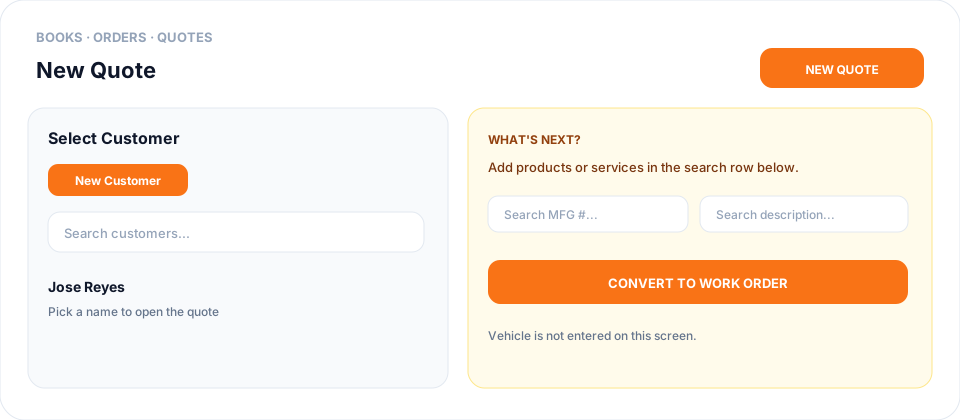
New Quote does not ask for the vehicle up front. After the quote opens, click + Vehicle on Vehicle Info — see How to add a vehicle to a quote in Books?.
Steps
- Open Books → Orders → Quotes.
- Click New Quote.
- In Select Customer, search and choose the customer, or click New Customer if they are not in the list yet.
- Wait until the quote opens. What’s Next says to add products or services in the search row below.
- In the search row, use Search MFG # or Search description and add each tire, part, or service. Set quantity and price on the line.
- Review tax and the total with the customer. Use Share or Print if they need a copy before they decide.
- When they accept, click Convert to Work Order.
Conclusion & best practices
Re-check stock and price on an older quote before converting — tires move. Convert to Work Order is the orange button on the quote. To put the car on the quote, click + Vehicle on Vehicle Info. You can also add cars from the customer’s Vehicles tab. Finding tires that fit is Products → Search by Vehicle, and that search does not save the car.