How to wipe and restart organization data with Fresh Start?
TB Books · data-migration · Last updated October 1, 2026 · Version 1
This process works in apps: TB Books, TB One, TB Sync, TB WMS, TB POS, TB CRM
This article will teach you how to run a clean wipe and restart organization data with Fresh Start, after turning the permission on in TB One.
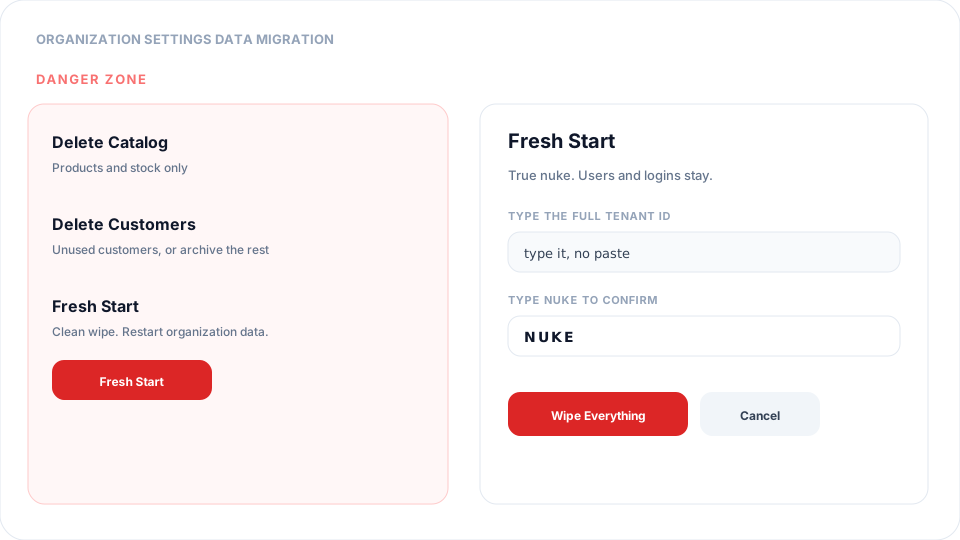
A clean wipe, data restart, or “start over” is Fresh Start. It is the Danger Zone action on Organization Settings → Data Migration. It deletes catalog, stock, customers, vendors, invoices, bills, journals, work orders, banking, locations, and auto-add rules, then reseeds the chart of accounts at $0 and a Main Warehouse. Users and logins stay. This is not reversible. The button stays off until you enable Run Fresh Start (Danger Zone) in TB One (one.tirebase.io) → Settings → Permissions for the role you sign in as. That toggle is not on Books → Settings → Permissions.
Steps
- Open TB One (one.tirebase.io) — use the app launcher if you are in Books. Do not look for this toggle under Books → Settings → Permissions; that page only shows Books-specific flags.
- Go to Settings → Permissions (Organization Settings). Confirm the header tenant is the organization you intend to wipe.
- Select the role you actually sign in as (Admin, or Superadmin if that is your role). Turn on Run Fresh Start (Danger Zone). Click Save.
- Return to Books (or TB One) → Settings → Data Migration and reload the page so the new permission applies.
- In Danger Zone, click Fresh Start. Read every consequence: catalog, stock, customers, vendors, invoices, bills, journals, work orders, banking, locations, and CRM/Sync operational data are removed. Users and auth are kept.
- Type the full tenant ID shown on the confirm dialog (copy/paste is disabled), then type NUKE, and submit Wipe Everything.
- Watch Activity for the Fresh Start job until it shows Done. Download the backup from that row if you need a copy before it expires (30 days).
Conclusion & best practices
Use Fresh Start only on training tenants or an empty shop you are willing to rebuild. Production live data cannot be restored from this wipe except the short-lived job backup. Delete Catalog and Delete Customers are smaller Danger Zone tools and do not require this permission. After a Fresh Start, re-import catalog and customers from Data Migration and confirm locations and tax rates before taking orders.