How to get started with TB Payments?
TB Books · payments · Last updated September 24, 2026 · Version 1
This process works in apps: TB POS, TB Books
This article will teach you what TB Payments is, which card-pricing options you can choose, and how to contact Tire Base to start card processing.
TB Payments is Tire Base card processing. It is not a separate app you install, and it is not the same as recording a customer payment, remittance, or bank deposit inside TB Books. Once you are processing, card totals go from TB POS to a Dejavoo terminal, and card batches reconcile in TB Books.
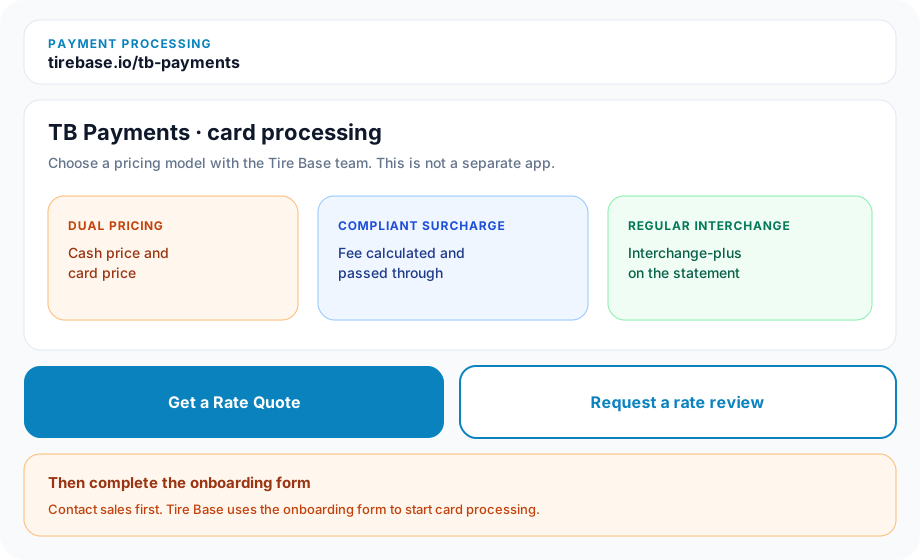
You choose one pricing model with the team: dual pricing (a cash price and a card price), compliant surcharge (the card fee is calculated and passed through on the ticket), or regular interchange (interchange-plus). You do not turn card processing on yourself in Settings. Contact Tire Base from the website, then complete the onboarding form so the team can set it up.
Steps
- Open the Payment Processing page at tirebase.io/tb-payments.
- Decide which model you want: dual pricing, compliant surcharge, or regular interchange (interchange-plus).
- Click Get a Rate Quote, or click Request a rate review. Both open Contact sales. Request a rate review uses tirebase.io/contact?interest=payments.
- On Contact sales, enter First name, Last name, Work email, Company, and a Message that says you want TB Payments, then click Send message. You can also open Contact us in the site footer at tirebase.io/contact.
- Complete the TB Payments onboarding form so the team can start card processing.
- Wait for Tire Base to confirm. Card processing is set up from that form. Get Started on the payments page starts a software trial; it does not submit this onboarding form.
Conclusion & best practices
After you are live, use the Books payment articles to record and deposit customer payments. Those articles do not start TB Payments. If you only need to apply a check, ACH, or an already-processed card to an invoice, use Receive Payment in Books. Ask the team before you switch between dual pricing, surcharge, and regular interchange — that change is part of the processing setup, not a Books toggle.