How to import historical transactions for go-live?
TB Books · data-migration · Last updated October 12, 2026 · Version 1
This process works in apps: TB Books, TB Sync, TB WMS, TB POS, TB One
This article will teach you the cutover order for customers, vendors, the opening trial balance, and historical invoices, bills, quotes, and purchase orders.
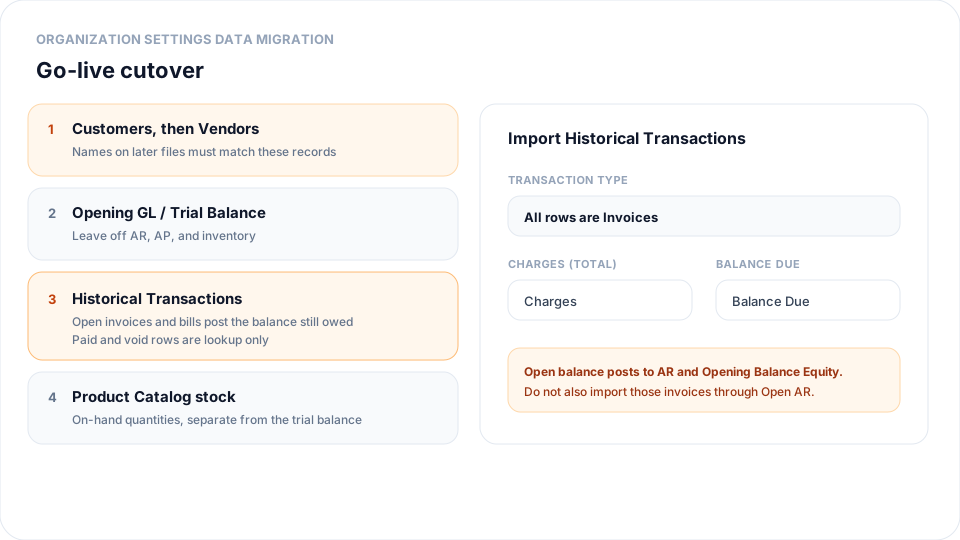
Organization Settings → Data Migration → Historical Transactions loads past documents from QuickBooks, NetSuite, Zoho, or a spreadsheet. Import customers and vendors first so names match. On go-live day, the opening trial balance excludes Accounts Receivable, Accounts Payable, and inventory. Open invoices and open bills are the detail that creates those balances. Paid, void, quotes, purchase orders, work orders, sales orders, and credit memos are saved for lookup and do not restate income or cash. Net an open credit into the invoice Balance Due in the spreadsheet before you upload.
Steps
- Go to Settings → Data Migration and import Customers, then Vendors. Names on later files must match those records exactly.
- In the spreadsheet, use one file per document type when you can (all invoices, or all bills). Put the original total in Charges and the amount still owed in Balance Due. Subtract open credits from that balance. Keep paid and closed rows if you want them for lookup.
- Open Historical Transactions and upload a UTF-8 CSV (maximum 2,000 rows). Save Excel files as CSV UTF-8 first.
- Map Transaction Type to the Type column, or choose All rows are Invoices (or Quotes, Work Orders, Sales Orders, Credit Memos, Purchase Orders, Bills, Vendor Credits, or Payments) when every row is the same document.
- Map Customer Name for customer documents, or choose Search customer and pick one customer. Map Vendor Name for purchase orders, bills, and vendor credits. Map Charges (Total), Balance Due, Date, and Document #. For a payment, map Document # to the payment number and Applied to Invoice # to the invoice already imported.
- Click Import and review Created, Skipped, and row errors. Rows that share a type and document number become one document. A total repeated on every line is used once. Different line amounts are added together.
- Open invoices post Accounts Receivable and Opening Balance Equity for the balance still owed. Open bills post Accounts Payable the same way. A payment links to that invoice and shows on it. If Balance Due already excludes the payment, there is no journal entry. If the invoice is still open for that amount, the payment debits Opening Balance Equity and credits Accounts Receivable. It never debits the bank or credits income.
- Import Opening GL / Trial Balance without Accounts Receivable, Accounts Payable, or inventory. Do not also import the same open invoices through Open AR or the same open bills through Open AP. Load on-hand quantities with Product Catalog.
Conclusion & best practices
Bring lists in first, then the trial balance the day before go-live with AR, AP, and inventory left off, then the open documents, then stock quantities. Closed history is there to look up. It must not hit Sales Revenue or cash again. If the same open invoice is imported twice — once here and once through Open AR or on the trial balance — Accounts Receivable is counted twice.