How to run Purchases by Vendor and Vendor Purchase History in Books?
TB Books · reports · Last updated November 25, 2026 · Version 1
This process works in apps: TB Books
This article will teach you how to see what you ordered, what the warehouse received, and what you bought from one vendor.
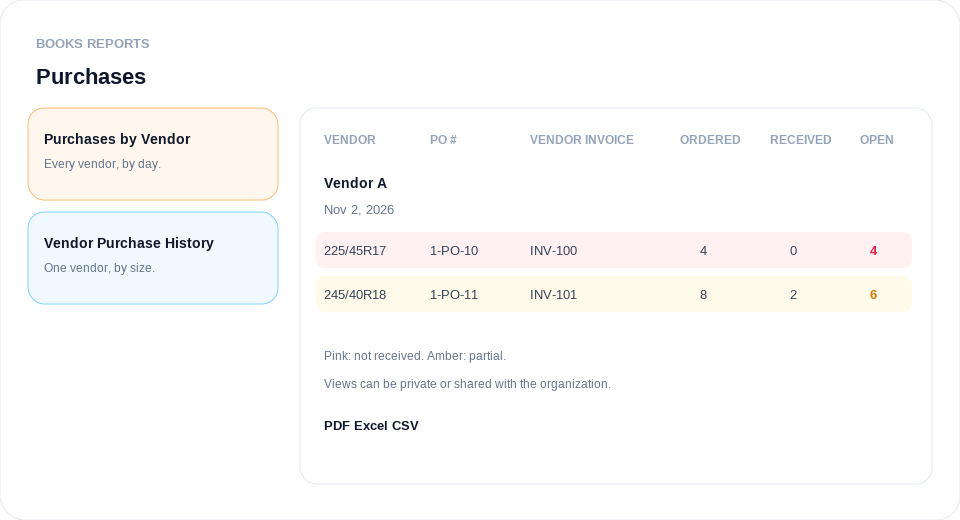
Books has two purchase reports on the Reports page. Purchases by Vendor lists every vendor by day, with the purchase order, the bill, the vendor invoice, and how many pieces were ordered, received, and still open. Vendor Purchase History is the same report for one vendor, grouped by tire size and model. Both download as PDF, Excel, and CSV. You can change columns and grouping, then save that layout for yourself or share it with the organization.
Steps
- Open Books, then Reports.
- Open Purchases by Vendor to see every vendor, or Vendor Purchase History to start with one vendor.
- Set the date range, then choose a vendor. Vendor Purchase History asks you to select a vendor before it runs. Location and Receipt narrow the same list. Not fully received shows only purchases the warehouse has not received in full.
- Group by adds up to three levels, such as Vendor, Day, Document, Size, Brand / model, or Part number. Columns chooses which fields are on the table and in the download.
- Pink rows are not received. Amber rows are only partly received. Click a row to open the purchase order, bill, or vendor credit.
- Turn on Summary by size and model when you want pieces, amount, number of purchases, and how many different days you bought that size.
- Use the download menu for PDF, Excel, or CSV. The file matches the columns and groups on the screen.
- Open Views to save the layout. Save as keeps a private copy. Share with organization lets every employee open it. Only the person who saved it, or an admin, can change or delete a shared view.
Conclusion & best practices
Enter the vendor invoice number on each bill. That is the number Purchases by Vendor uses when you compare Books with a vendor portal. A bill linked to a purchase order is part of that order, so the report does not count the same purchase twice.