How to run the GST/HST and provincial tax report in Books?
TB Books · tax · Last updated October 1, 2026 · Version 1
This process works in apps: TB Books
This article will teach you how to open the Canadian tax report, read GST or HST for the CRA, and read PST, RST, or QST for the province.
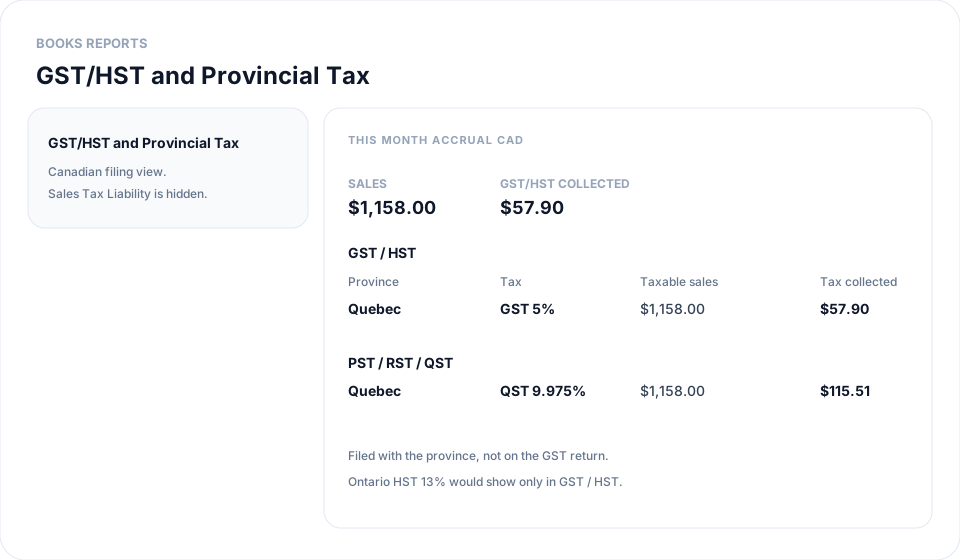
Canadian shops do not use Sales Tax Liability. That report is for US sales tax and is hidden when Tax Country is Canada. Books → Reports → GST/HST & Provincial Tax is the filing view: one section for GST or HST, and a second section for PST, RST, or QST. Amounts are CAD. Input tax credits on bills are not on this report.
Steps
- Confirm Organization Settings → Tax Rates shows Tax Country Canada. If the shop is still United States, Reports shows Sales Tax Liability instead of this report.
- In Books, open Reports.
- Open GST/HST & Provincial Tax. Do not look for Sales Tax Liability. That card is hidden for a Canadian shop.
- Set the date range to the filing period. This month is the default. Use a custom range when the return covers a quarter. Report Basis Accrual uses the invoice date. Cash uses the date the customer payment is applied.
- Read Sales and GST/HST collected at the top. Sales is every supply in the period. GST/HST collected is the federal tax. Copy those when you file with the CRA. HST provinces (Ontario, Nova Scotia, and the Atlantic provinces) appear only in the GST / HST table. There is no second GST line.
- Read the PST / RST / QST table under that. British Columbia and Saskatchewan are PST. Manitoba is RST. Quebec is QST (TVQ). Those amounts are filed with the province, not on the federal return.
- Click a tax name to see the invoices and credit memos behind the amount. Export to CSV if you want the same rows in a file.
Conclusion & best practices
This report is tax collected, not the net cheque after input tax credits. Bills do not reduce the number. The tire recycling fee is not in these tax rows. Fee dollars and tire counts are on How to run the tire levy report in Books?. Setup for the rates is in How to set Canadian GST, HST, PST, and tire levies in Books?.