How to connect your own domain to a sales channel?
TB Sync · settings · Last updated October 11, 2026 · Version 1
This process works in apps: TB Sync
This article will teach you how to attach your hostname to a B2B Portal, B2C Widget, or Dropship Portal and verify the DNS records.
Use this when dealers or shoppers should open your address — a B2B Portal, a B2C Widget, or a Dropship Portal — instead of a tirebase.io link. Skip it when you are only pasting the widget into a website you already have. That path is Embed Codes on the sales channel, not a domain. See When do I connect my own domain for a B2B portal or widget?.
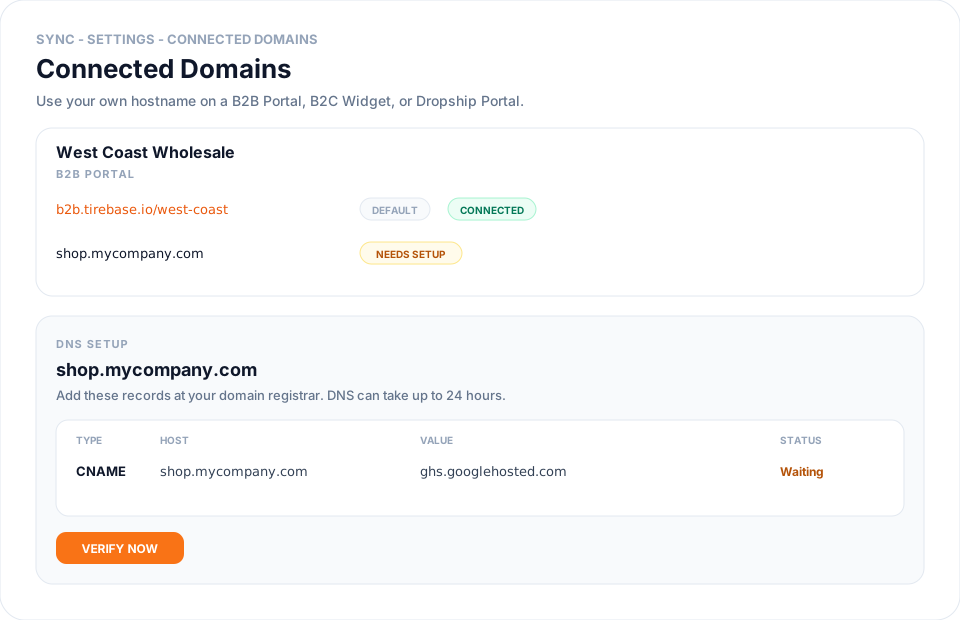
Each sales channel already has a Tire Base URL (for example b2b.tirebase.io/your-channel). Connected Domains lets you add shop.mycompany.com so that address opens the same channel. Sync shows the exact DNS records to copy, then Verify now after you add them at your registrar.
Steps
- Open Settings in Sync, then Connected Domains.
- Click Add domain. Enter the hostname (for example shop.mycompany.com) and choose the B2B Portal, B2C Widget, or Dropship Portal it should open.
- Copy the Type, Host, and Value rows into your domain’s DNS manager. A CNAME is typical. Some hosts also need a TXT record.
- Wait for DNS to publish. Changes can take up to 24 hours. Click Verify now when the records are saved. Sync shows Verification in progress until the records are detected, and also re-checks automatically every hour.
- When status is Connected, SSL is live. Use Make primary if this hostname should appear in invites and emails. The Tire Base URL stays as Default.
Conclusion & best practices
Do not type a hostname on the sales channel Overview tab — manage it here so ownership can be verified. You do not need this page to embed a widget or booker on another site. Apex domains (mycompany.com with no subdomain) may need extra A records from the setup drawer. If Verify now still fails after 24 hours, compare Host and Value character-for-character with the table. Related: When do I connect my own domain for a B2B portal or widget? and How to configure a sales channel in Sync?.