How is tax charged on B2B and B2C Widget checkout?
TB Sync · sales-channels · Last updated October 21, 2026 · Version 1
This process works in apps: TB Sync, TB Books
This article will teach you where B2B portal and B2C Widget checkout get their tax, how Canadian GST/HST/PST/QST and the tire levy show, and what the shopper is asked for.
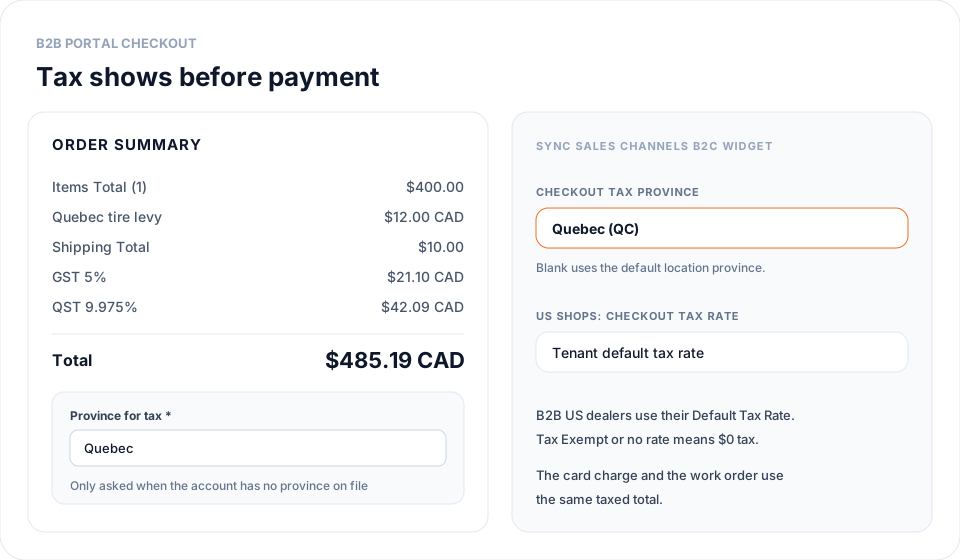
The B2B portal and the B2C Widget show tax before the customer pays. A card payment or deposit is charged for that taxed total, in CAD for Canadian shops. The work order saves the same tax rows, so the invoice matches what the customer saw.
Steps
- US B2B orders use the dealer's Default Tax Rate on the customer record. A dealer with no rate or Tax Exempt pays $0 tax. Shipping is not taxed.
- Canadian B2B orders use the province rules on Organization Settings → Tax Rates. The province comes from the customer Province Override, then the ship-to address, then the customer address. Pickup orders use the pickup location. GST/HST, PST, and QST show as their own rows, and shipping is taxed.
- The province tire levy (EHF) is added to each tire on Canadian B2B orders unless the customer is marked EHF exempt. Customer PST/QST exempt and First Nations exempt settings apply too.
- If nothing on the account names a province, checkout asks the dealer to pick one. If the shop requires a GST/HST number on customers and the dealer has none, checkout asks for it. Answers are saved to the customer only when that field was blank. A province or number already on the account is shown read-only.
- The B2C Widget uses one tax setting per channel. Open Sync → Sales Channels → the B2C Widget channel → Settings. US: Checkout tax rate (blank uses the tenant default rate). Canada: Checkout tax province (blank uses the default installer location province). Only that province's tire levy is added.
- Cart and checkout list each tax row and the tire levy line, then the total. Canadian totals end in CAD.
Conclusion & best practices
Tax on storefront orders follows the same rules as Books invoices. Change a dealer's Default Tax Rate, Province Override, or exemptions on the customer record. Province rates are covered in How to set Canadian GST, HST, PST, and tire levies in Books?.